01
16.S893Sheet 01 of 15Session
Session 13 · Tuesday 27 October 2026
Make the agent show its work
16.S893AI Agents for Engineering Research
02
16.S893Sheet 02 of 15Session
Today
- Effectively supervising agent work
- When and what to outsource to an agent
- Pod discussions
- Making agent work easier to review
03
16.S893Sheet 03 of 15Session
Agents often give you something like this
Commit 24d25af (AA-15, "xfoil_polar v1.2: Cp files in both modes") adds an optional
`cp: true` request field to `xfoil_polar`. In either `viscous` or `inviscid` mode, it
writes an XFOIL `CPWR bl/aNNN.cp` file per angle and sets `points[].cp_file` for
converged points (null otherwise, with a new `cp_file_missing` warning for
missing/truncated files). `boundary_layer` now implies `cp`. Backlog task AA-15 is
marked Done, with updated contract/schemas/SKILL, Python/Node test suites passing
(184/27, no stray processes), and a real-binary test matching inviscid Cp at α=4°
against a direct XFOIL `CPWR` run within 2e-5. It appears to work as implemented.
04
16.S893Sheet 04 of 15Session
Two extremes of working with agents
Accept everything
- You go fast at first
- You build up cognitive debt
- You cannot build on the work, because you do not know whether it works or whether you can trust it
Read everything
- You read every diff and every log
- You become the bottleneck
- Reading code that someone else wrote is slow, so you lose the time the agent saved you
05
16.S893Sheet 05 of 15Session
Identify the core intellectual contribution of your project, and do that part yourself.
On the rest of the project, you supervise, and you judge the work that the agent did on your behalf.
06
16.S893Sheet 06 of 15Session
What's the balance?
| A plotting script | A solver boundary condition | |
|---|---|---|
| 1 How likely is the agent to be wrong? | Not very | Quite likely |
| 2 How bad would a missed error be? | Cheap, you redo the plot | Every result after it is wrong |
| 3 How easily would you notice it? | Easily, the plot looks wrong | Hardly, the numbers look plausible |
| So how closely should you check it? | A quick glance is probably good enough | Check it thoroughly. Make it programmatic and systematic, with no magic numbers |
Beyond all this, you need to check your core contribution yourself, thoroughly.
07
16.S893Sheet 07 of 15Session
When code is cheap to write
- You can afford far more elaborate tests than you would write by hand, e.g., compare two languages before you choose one
- You can start over with what you learned, because the agent can rebuild the routine parts quickly
- The core still needs your time, because you have to build on top of it, and that needs strong foundations
08
16.S893Sheet 08 of 15Session
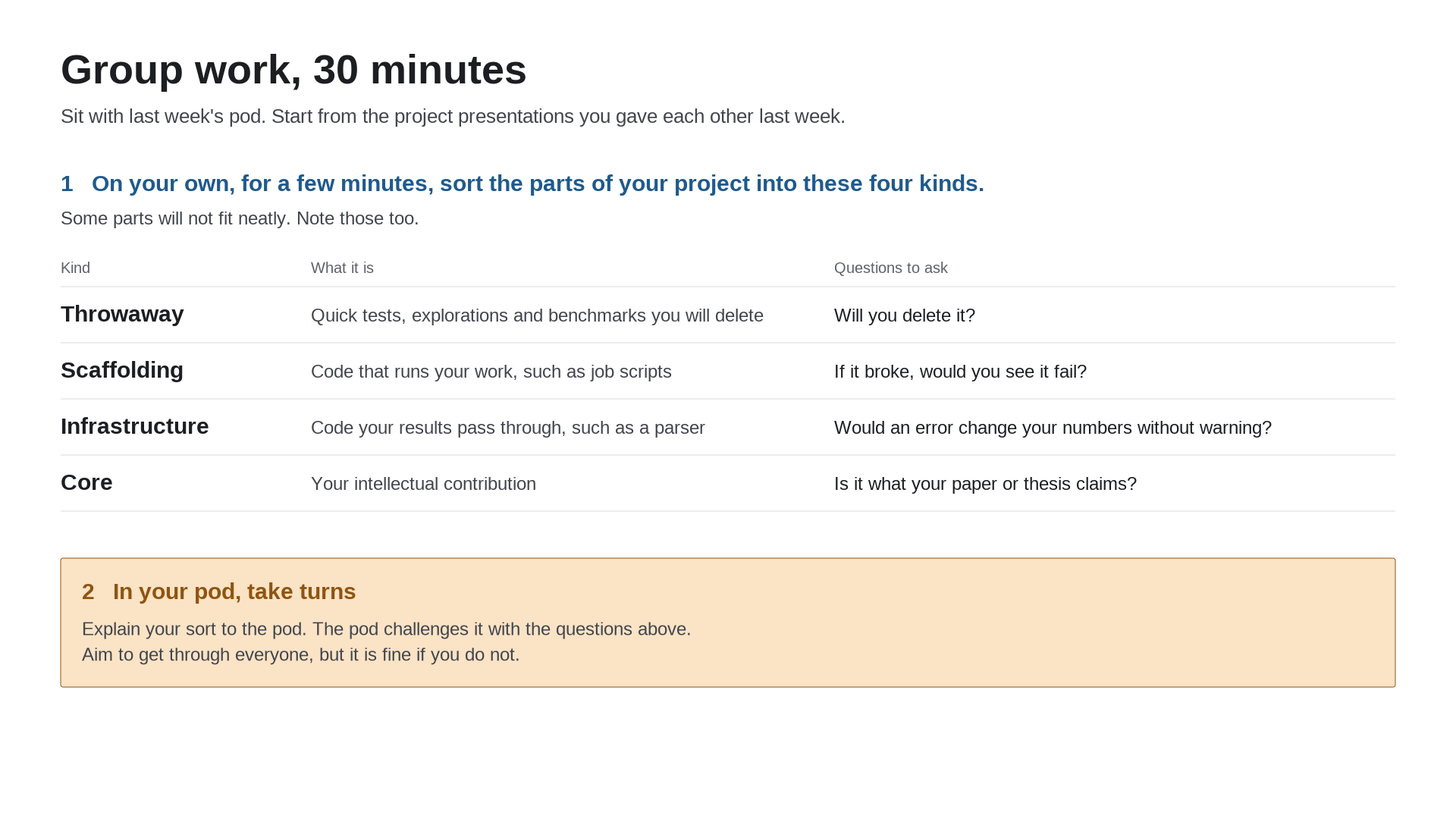
Four kinds of code in a project
| Kind of code | What it is | Evidence it needs |
|---|---|---|
| Throwaway | Code you will delete, such as exploration scripts or a quick benchmark | It runs and the output looks right |
| Scaffolding | Code that runs your work, such as job scripts. If it breaks, you see it fail | It runs end to end, and you saw it |
| Infrastructure | Code your results pass through, such as parsers or a wrapped solver. An error here changes your numbers silently | A test against an independent reference, such as a direct solver run or a known case, that fails without the change |
| Core | The formulation and the analysis behind your claim | A re-run case, a known limit or independent data |
A test needs the same evidence as the code it tests. No test is throwaway.
09
16.S893Sheet 09 of 15Session
10
16.S893Sheet 10 of 15Session
Making agent work easier to review
11
16.S893Sheet 11 of 15Session
Questions to ask about an agent's work
| Question | What it catches |
|---|---|
| What exactly is claimed, and how sure is the agent? | A vague claim |
| Was each claim measured, or only stated? | “It is faster”, with nothing timed |
| Where is the command and its output? | “It works” with no proof |
| Does the new test fail without the change? | Tests that don’t test anything |
| Was any test or check changed or deleted? | Passing by weakening the check |
| What would show this is wrong, and did anyone look? | Looking only for confirmation |
| Which one or two things does the result depend on? | Missing the part that matters most |
12
16.S893Sheet 12 of 15Session
13
16.S893Sheet 13 of 15Session
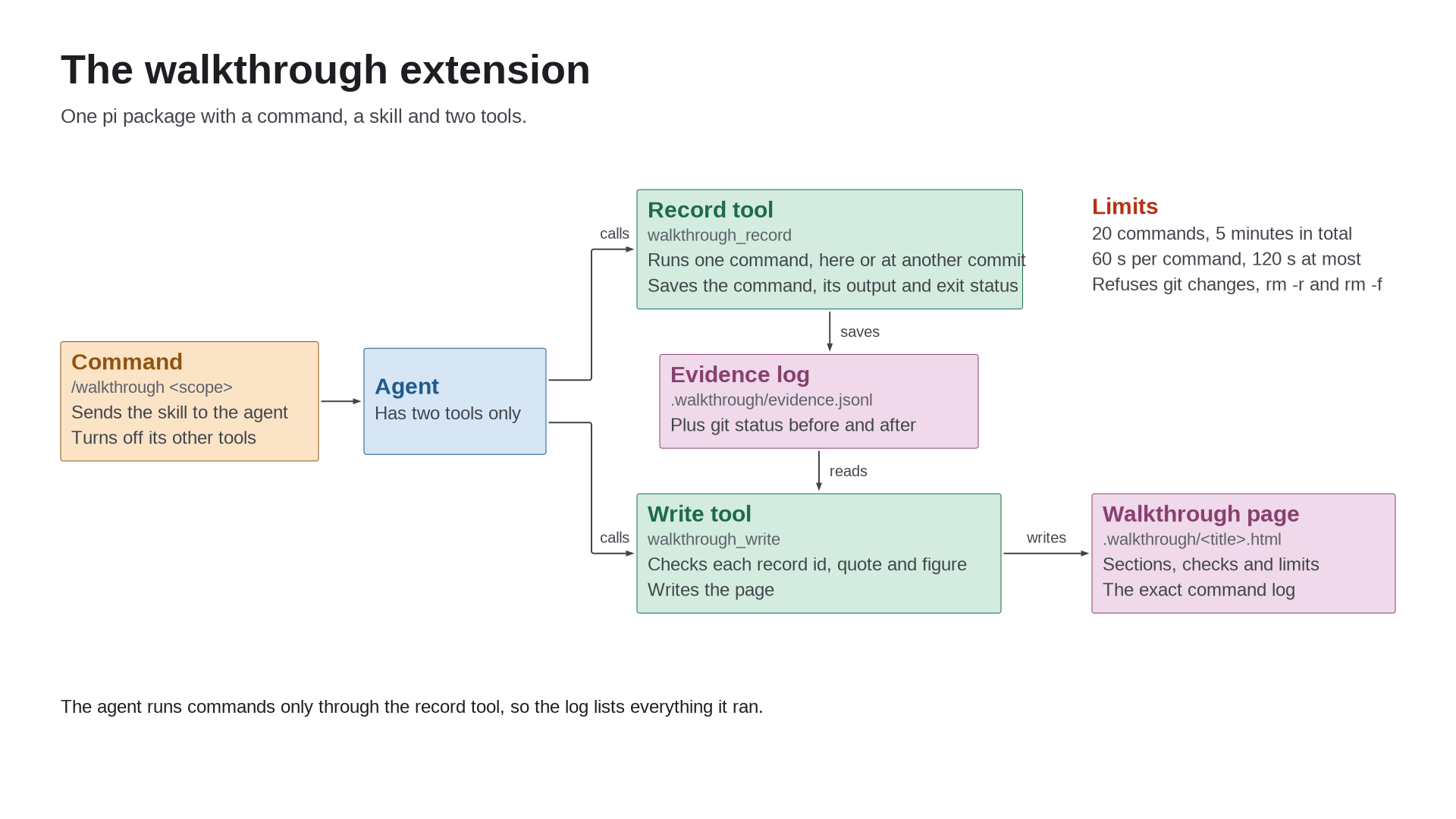
Demo
# Ask for a walkthrough of the last several commits
pi
> /walkthrough explain to me all the changes that we made in the previous
  several commits and how that improved and sped up the code
# Your turn. Install the extension from npm
pi install npm:show-not-tell
# Then start a fresh session in your own repository and ask
pi
> /walkthrough my last commit that changed code14
16.S893Sheet 14 of 15Session
Techniques so far
| Technique | Session | In one line |
|---|---|---|
| Context | 2, 3 | All the model knows about your problem is in the window |
| Skill | 3 | A file the model reads when the task matches |
| Sandbox | 4 | Limit what a wrong tool call can do |
| Approved tests | 6 | The agent proposes tests; you approve them |
| Task file | 7 | One task, one fresh session, one approved test |
| Tool, script, agent | 7 | Where does the output go? A schema, a file, a fresh context |
| Walkthrough | 13 | The agent records what it ran; you check what matters |
15
16.S893Sheet 15 of 15Session
By Thursday 5 November
Do
- In a fresh session, run
/walkthroughon the last feature you built for your project, and commit the page to your repo - Write a dev-log paragraph that identifies your core contribution, one part you do not yet know how to check, and how you plan to check it
Read
- Cognitive debt (10 min)
- How closely to review AI code (10 min)
- Code you have proven to work (5 min)